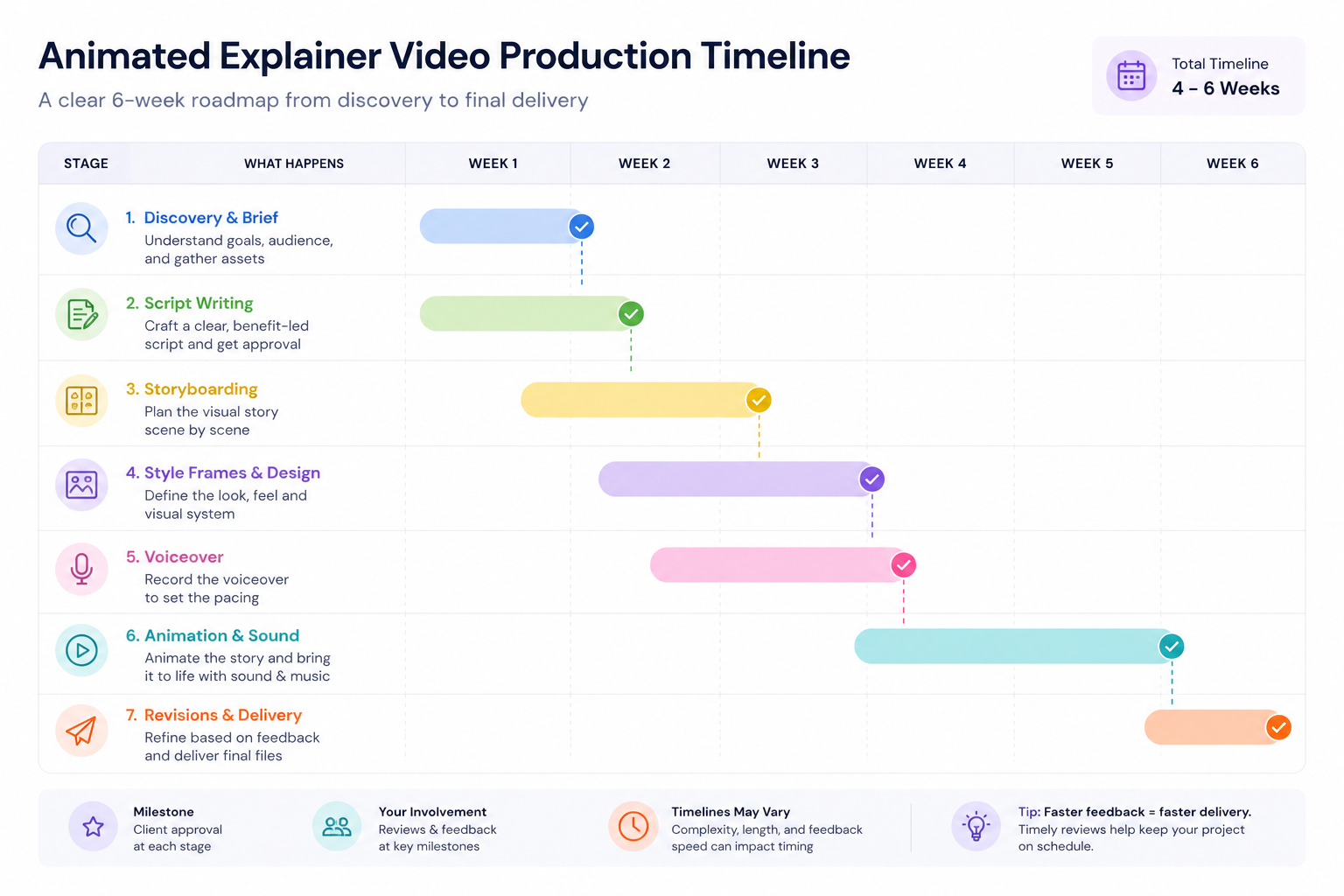
Producing an animated explainer video is a structured process designed to turn a complex idea into a clear, engaging story. While every project is different, most follow the same seven stages: discovery, scriptwriting, storyboarding, design, voiceover, animation and sound, and finally revisions and delivery.
Each stage has a specific purpose. The script defines the message, the storyboard plans the visuals, the design establishes the look and feel, and animation brings everything together. Following the process in this order helps avoid costly revisions later and keeps the project moving efficiently.
Discovery & Brief: Building the Foundation
Every successful explainer video starts with understanding the problem it’s meant to solve. Before we write a script or design a single frame, we spend time learning about your product or service, audience, and business goals. That gives us the context to create a video that doesn’t just look good — it communicates the right message.
During discovery, we’ll discuss questions like:
- What should viewers do after watching the video?
- Who is the target audience, and what do they already know?
- Which problem does your product or service solve?
- What makes your solution different from the alternatives?
- Where will the video be used — your website, social media, ads, sales presentations, or onboarding?
This stage is also where we gather everything the production team needs to work efficiently. That usually includes your logo, brand guidelines, fonts, colour palette, product access, screenshots, existing marketing material, and any examples of videos or visual styles you like.

Storyboarding: Planning the Visual Story
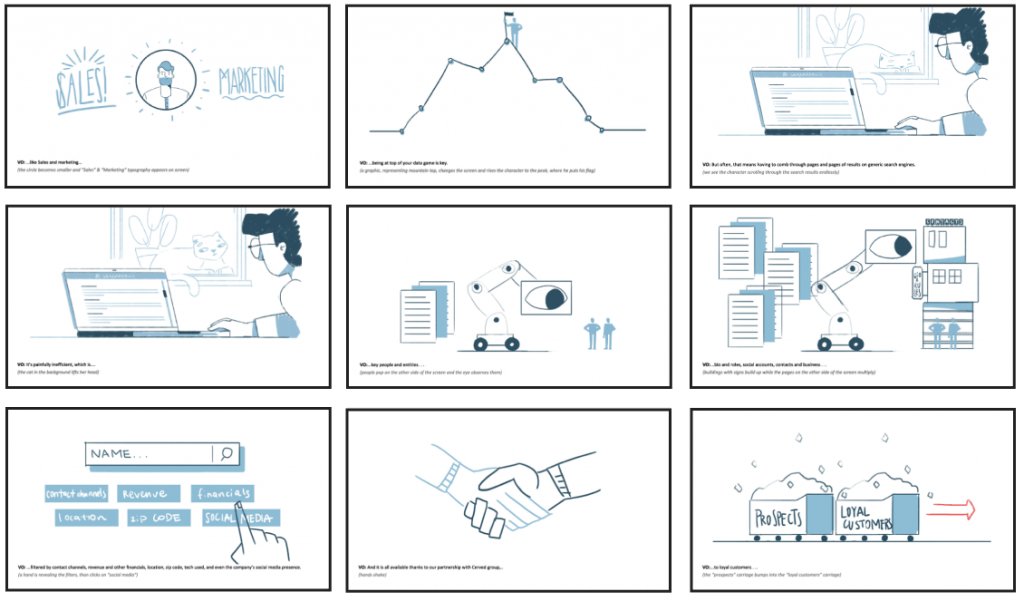
Once the script is approved, we translate every line into a visual plan. This is the storyboard — a scene-by-scene blueprint that shows how the story will unfold before animation begins.
Each frame outlines what appears on screen, how the viewer’s attention moves from one idea to the next, and where key transitions or product demonstrations happen. The artwork is intentionally simple at this stage.
Storyboarding gives all the stakeholders a chance to review the visual direction before production becomes time-intensive. It’s much quicker to adjust a sequence of sketches than it is to revise finished animation, which is why this stage plays such an important role in keeping projects efficient and on schedule.
Wherever possible, we design storyboards around your actual product rather than generic illustrations. If we’re explaining a SaaS platform, for example, we’ll base scenes on the real interface so the final animation reflects what customers will actually see. This creates a more credible explainer and reduces the amount of redesign needed later in production.
Style Frames & Visual Design: Defining the Look
With the storyboard approved, we move from planning to design. This is where the video begins to take on its visual identity.
Rather than designing every scene immediately, we irst create a handful of style frames — fully designed still images taken from key moments in the storyboard. These establish the visual language for the entire project, including the colour palette, typography, illustration style, iconography, UI treatment, and overall art direction.
Our design process is always guided by your brand. We incorporate your existing visual identity wherever possible, ensuring the finished explainer feels like a natural extension of your website, product, and marketing materials rather than a standalone creative piece.
For software and SaaS products, we also recreate product interfaces with care, balancing visual clarity with accuracy. Instead of generic placeholder screens, viewers see an interface that closely reflects the real product, making the explainer more credible and easier to follow.
Once the style frames are approved, we apply the same design system across every scene. This creates a consistent visual experience and establishes a reusable asset library that makes future videos faster and more cost-effective to produce.

Voiceover: Setting the Pace
After the script and visual direction are approved, we record the voiceover. This happens before animation because the narration determines the pacing of every scene.
We’ll present a selection of professional voice artists based on your audience, brand personality, and the tone you’re aiming to achieve. Whether you need something warm and conversational, confident and corporate, or energetic and promotional, choosing the right voice has a significant impact on how viewers perceive your message.
If your audience spans multiple regions, we can also produce voiceovers in different accents and languages.
Animation & Sound Design
With the storyboard, visual design, and voiceover approved, production moves into animation. This is where every element comes together to transform a series of static designs into a clear, engaging story.
Working from the approved voiceover, our animators choreograph every movement to support the narration. Product interfaces are introduced at the right moment, graphics appear only when they’re needed, and transitions are timed to help viewers absorb one idea before moving to the next. The objective isn’t simply to make the video look dynamic — it’s to make the message easier to understand.
The animation process varies depending on the chosen style. Motion graphics projects typically move more quickly because they rely on graphic elements, typography, and interface animation. Character animation and 3D production require additional modelling, rigging, lighting, and scene animation, making them more time-intensive. Regardless of style, every scene is reviewed internally to ensure consistency, pacing, and visual quality before it’s shared with you.
Sound design is developed alongside the animation rather than added as an afterthought. Subtle sound effects reinforce interactions, transitions, and key moments without distracting from the narration, while carefully selected background music helps establish the right pace and mood. Together, these elements give the finished video a polished, professional feel.
Before the project moves into revisions, we’ll share a complete first cut for review. At this stage, you’ll see the entire video — including animation, voiceover, music, and sound design — as a finished production. This allows you to evaluate the overall flow, messaging, and visual storytelling before final refinements are made.
Revisions & Delivery
Review and feedback are built into the production process, not left until the very end. By gathering approvals at key milestones, we can make changes while they’re still quick and cost-effective, rather than revisiting completed animation.
Most explainer projects include 2–3 rounds of revisions, covering everything from script refinements and visual adjustments to animation timing and on-screen messaging. Consolidating feedback from everyone involved before each review also helps keep the project moving efficiently and avoids conflicting revision requests.
Once the final version is approved, we’ll prepare the delivery files in the formats you need. Depending on your requirements, these may include:
- Final explainer video in 1080p, 2K, or 4K
- Web-optimised versions for faster loading
- Social media edits and cutdowns
- Captioned versions for silent viewing
- Thumbnail artwork for YouTube or landing pages
- Source-friendly exports where requested
The result is more than a single video — it’s a collection of assets that can be used across your website, product, email campaigns, presentations, and social media.
What This Looks Like on a Real Project
A good example of this process in practice is a 120-second SaaS explainer we produced for Operator One.
The company had a familiar challenge. New users were signing up successfully but struggling during the onboarding process, leading to lower week-one activation and an increasing number of support requests. They needed a clear way to explain a multi-step integration both on their landing page and inside the product itself.
The project began with a discovery workshop to understand the onboarding journey and identify exactly where users became stuck. From there, we wrote a concise script and developed a storyboard that mirrored the product’s actual interface screen by screen. Rather than relying on generic software illustrations, viewers followed the same workflow they would encounter after signing up.
To simplify technical concepts such as system connections and data movement, we combined realistic UI recreations with isometric motion graphics. The visual system we developed was also designed to be reusable, allowing future feature videos to maintain the same look and feel without starting from scratch.
Alongside the main 120-second explainer, we delivered captioned versions and a QR-code-enabled version for exhibition displays, giving the marketing team additional ways to use the content beyond the website.
As the client’s Marketing & Communication Specialist, Viktória Lafferthon, put it:
“I was impressed by their dynamics and project management.”
Frequently Asked Questions
How long does it take to produce an animated explainer video?
A typical 60-second explainer takes between four and six weeks from kickoff to final delivery. More complex projects, such as character animation, 3D animation, or multilingual versions, may require additional production time.
What information do you need before production starts?
We’ll usually need a clear understanding of your goals, target audience, product or service, brand assets, and access to your product if the video includes software demonstrations. The more context we have at the beginning, the smoother the production process becomes.
How many revisions are included?
Most projects include two rounds of revisions. Feedback is collected at key production milestones so changes can be made efficiently before moving to the next stage.
Can you recreate our product interface?
Yes. Wherever possible, we design scenes around your actual product rather than generic mock-ups. This helps viewers recognise the interface they’re about to use and creates a more authentic product walkthrough.
Do you provide voiceovers in different languages?
Yes. We work with professional voice artists across multiple languages and accents, making it straightforward to create localised versions for international audiences.
What files will we receive?
We’ll deliver the final video in the formats agreed during the project, along with any additional deliverables such as captioned versions, social media edits, thumbnails, or presentation-ready exports.
How much does an animated explainer video cost?
Pricing depends on factors such as video length, animation style, complexity, and the number of deliverables required. Motion graphics projects are generally more affordable than character animation or 3D, and we’re happy to provide a tailored quote once we understand your requirements.
Ready to Start Your Explainer Video?
Producing an animated explainer video doesn’t have to feel complicated. With a structured production process, clear approval stages, and one team managing everything from scriptwriting to final delivery, you’ll always know what happens next and where your feedback fits into the project.
Whether you’re launching a new product, simplifying a complex service, or improving customer onboarding, a well-produced explainer video can help people understand your message faster and take action with confidence.
If you’re planning an explainer video, reach out — we’d be happy to discuss your goals, recommend the right animation style, and provide a realistic timeline and quote for your project.